Like many engineers, I have been using Excel for calculations for as long as I can remember. Despite the criticism Excel often receives from, I have always believed that it is an incredibly powerful and flexible tool—when used correctly.
The problem is not Excel itself. The problem is that many users only take advantage of a small fraction of its capabilities. Excel can do much more than simple tables and formulas, but even with advanced knowledge, there are still some challenges when using it for engineering calculations.
One issue I have repeatedly encountered is the transition from calculation to a professional engineering report. The calculations may be correct, but presenting them clearly and consistently can become time-consuming.
Some of the difficulties I often faced were:
- Writing equations in Excel is frustrating. Creating clean, readable engineering formulas is not intuitive.
- Managing units can become complicated. Keeping track of millimeters, meters, kilonewtons, and other units throughout a calculation requires constant attention.
For some time, I searched for a tool that could make the calculation and reporting process more efficient. That is when I discovered Calcpad, an open-source engineering calculation software package.
After using it, I was impressed by how simple and effective it is. It is lightweight, extremely fast, and focuses on exactly what engineers need: writing calculations, checking results, and producing professional reports.
Some features that make Calcpad stand out:
✅ Simple equation writing
Writing formulas and equations is much easier compared with traditional spreadsheet software. Complex expressions can be written naturally, making calculations easier to read and understand.
✅ Fast calculations
Calcpad performs engineering calculations quickly without the overhead of large spreadsheet files.
✅ Easy unit conversion
Units can be converted instantly using a simple command. For example:
mm | m
automatically converts millimeters to meters.
✅ Automatic unit checking
Calcpad can verify whether the units in your equations make sense. For example:
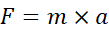
should result in a force unit (Newton). This helps catch mistakes before they reach the final report.
✅ Professional reports with one click
Once the calculation is complete, generating a formatted Microsoft Word or PDF report is straightforward and it is done with one click. This saves significant time compared with manually formatting calculations in Excel.
Final thoughts
Excel remains an excellent engineering tool, and I still use it regularly. However, for calculations that require clear equations, unit control, and professional documentation, Calcpad provides a much smoother workflow.
For engineers who spend hours preparing calculation sheets and reports, this small piece of software is definitely worth exploring.
Download
To download this amazing tool, go to the following link.
How to try this tool without installation?
You can also try this tool without the installation by going to the following link. I also found an another link. I am not sure if this is affiliated to the original CalcPad.